
A money planner for real, messy lives
Know what you can actually spend
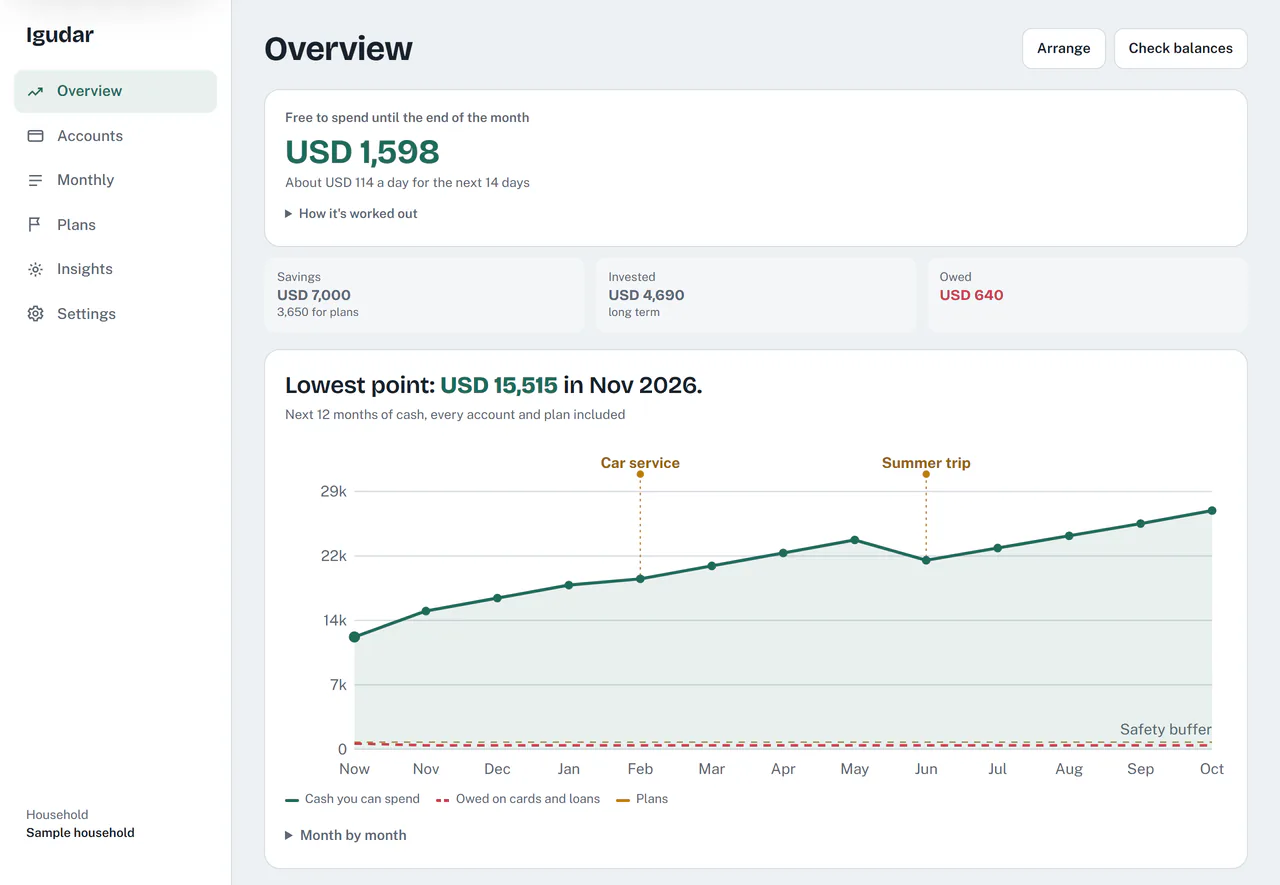
Wherever you live, Igudar brings your accounts, cards, rent and plans together, then shows what is free to spend until payday and how the next 12 months look.
How it works
Tell Igudar how your money comes and goes, and it does the sums for you.
-
Add your accounts and bills
Your bank accounts and cards, your salary, your rent and the bills that come back every month.
-
See what is free to spend
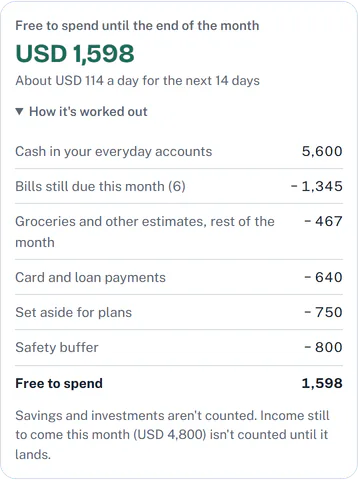
Igudar takes off the bills still due, card payments, money set aside for plans and your safety buffer, and shows what is left until payday.
-
Check the months ahead
A forecast of your cash month by month, with every rent payment and plan in it, shows a tight month before you get there.
Today's money and the months ahead
Six parts of Igudar, each pictured as it looks in the app. The household and its AI suggestions are samples, made up for these pictures.
-
Free to spend
One number for what you can spend until payday, with the bills still due, card payments, plans and your buffer already taken off.
-
Forecast
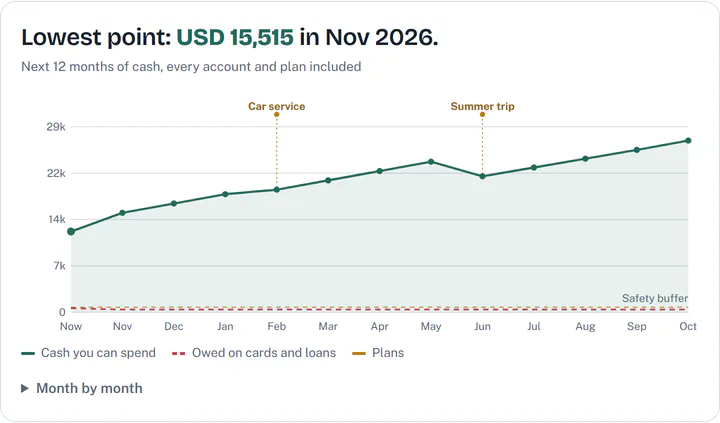
Your cash month by month, every account and plan included, and the lowest point named, so you see a tight month coming.
-
Rent and cards
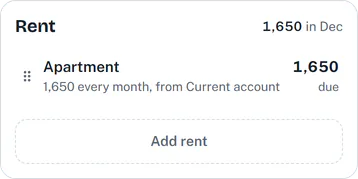
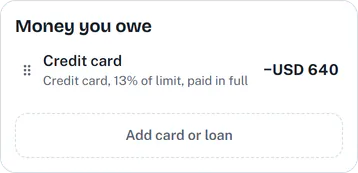
Rent lands in the months it is due, whether you pay it every month, by cheques or on dates of your own, and each card is paid the way you pay it: in full, a fixed amount or the minimum.
-
Plans
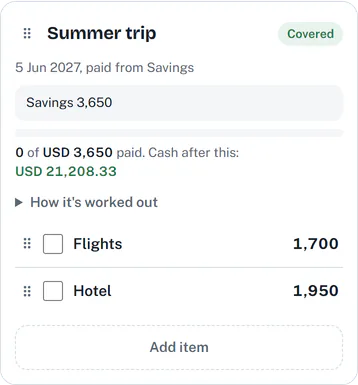
A trip, a car service or a move: add what it costs and when, choose the account that pays, and see whether it is covered.
-
Voice logging
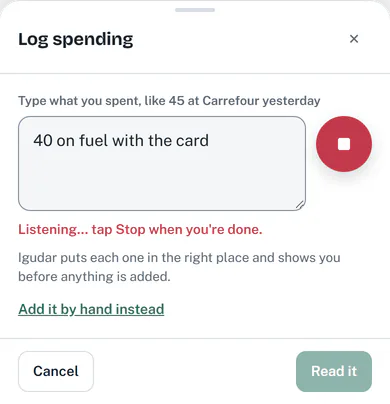
Tap the mic and say what you spent. The words fill the box as you speak, and you check each line before it is added.
-
AI insights
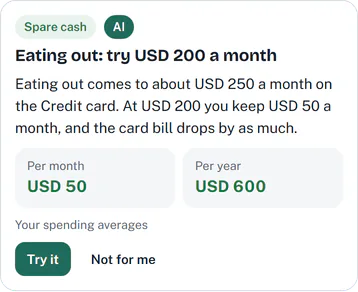
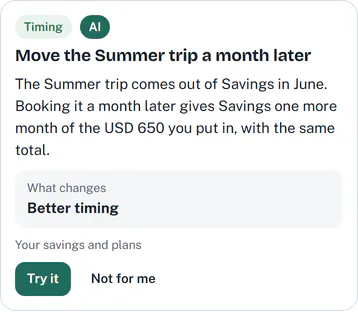
Suggestions from your own numbers, from Igudar's rules and, when you ask, from the AI. Try it shows the change in your forecast before anything is saved.
Built for the way you are paid
Igudar asks where you live first, then starts from the way pay and rent usually work there. Every default stays yours to change.
-
Paid monthly, every two weeks, twice a month or weekly
Tell Igudar how you are paid, and each payday shows on its date, to tick once it lands.
-
Months that start on payday
Paid before the month ends? Your month can run from one payday to the next, so each salary goes with the rent and bills it pays.
-
Rent the way you pay it
Every month, by post dated cheques or on dates of your own, with any housing fee your city adds, worked out from your yearly rent.
-
Free to spend until your next payday
What is free to spend runs to your next pay date, even across the end of a month.
-
Your own currency
Your plan is in the currency you pick, and an account or an investment in another keeps its own, counted at the rate you set.
Security and privacy
What Igudar keeps, who can see it, and how you take it with you or delete it.
-
Notes and AI requests encrypted
The notes you write on plans and spending are stored encrypted. So is what is sent to the AI, and it is deleted after thirty days.
-
No bank details for the AI
Igudar does not ask for bank logins, card numbers or account numbers, so the AI never gets them. It is never sent your email address either.
-
Support only with your permission
Support sees your money only if you allow it in Settings, for a day or three days, and you can turn it off sooner.
-
Export or delete your data
Export everything in your plan from Settings. Delete your account there too: seven days after you confirm by email, it is gone for good.
-
Never sold, no ads
There are no ads in Igudar, and your data is never sold.
-
Analytics only if you opt in
In the app, analytics stays off until you turn it on in Settings.
Read the Privacy Policy for the details.
What it costs
Start on the free plan: signing up asks for no card.
-
Free
Free for everyone, with no time limit.
- Every part of the planner: accounts, rent, bills, plans and the forecast, with import and export.
- AI on your own key from Anthropic, OpenAI, Google Gemini, DeepSeek or OpenRouter. The provider bills you for what you use.
- Igudar's own AI within monthly limits during the beta, then credits once to try it.
-
Plus
ComingMore of Igudar's own AI each month, in steps.
- 2,000 credits a month About 66 questions or 40 checks of your plan
- 4,200 credits a month About 140 questions or 84 checks of your plan
- 8,500 credits a month About 283 questions or 170 checks of your plan
- 15,000 credits a month About 500 questions or 300 checks of your plan
- 33,000 credits a month About 1,100 questions or 660 checks of your plan
The price of each step comes with Plus.
Questions and answers
Short answers about what Igudar does, and what it does not do.
What is Igudar for?
Knowing what you can actually spend, and whether you will be OK in the months ahead. Add your accounts, cards, salary, rent and plans, and Igudar shows what is free to spend until payday and a forecast of your cash month by month.
Does it connect to my bank?
No. You type in your balances, bills and plans, and update your balances whenever you check them. Igudar does not ask for your bank login, card numbers or account numbers.
What does the AI see?
Only what the feature you use needs, and only when you use it. For insights, a summary of your plan: whole amounts and the names you gave things, plus your question when you ask one. To log spending, the words you say or type, with the names of your items, accounts and recent shops. To check a price, the subscription's name, your country and your currency. Igudar never adds your email address, and it has no account numbers to send. Settings shows exactly what gets sent.
What does it cost?
Nothing to start: the planner is free for everyone. Its AI works on your own key, which the provider bills you for, and during the beta Igudar's own AI is included within monthly limits. A paid plan, Plus, with more of Igudar's own AI each month, is coming. Igudar takes no payment today, and signing up asks for no card.
Can I use my own AI key?
Yes. Save a key from Anthropic, OpenAI, Google Gemini, DeepSeek or OpenRouter in Settings, under AI, and your AI requests go out on it, with no monthly limit from Igudar. The provider bills you for what you use. Checking a price searches the web, which only a key from Anthropic or OpenAI can do. With another key, you can check prices on Igudar's own AI instead. Igudar keeps your key encrypted and reads it only to make a call with it. It never comes back to your browser, only its last four characters, and it is in no log, no export and no admin page.
What are AI credits?
A credit is a small, fixed slice of what the AI costs Igudar: a question takes about 30 credits, a check of your plan about 50. A request that fails uses none, and a request on your own key uses none at all. Credits will pay for Igudar's own AI once billing starts, and you will get credits once, to try it. Until then, during the beta, Igudar's own AI comes within monthly limits instead.
Does it work on my phone, and offline?
Yes. Igudar works in your phone's browser, and you can add it to your home screen. Without a connection it shows your plan as it was the last time you were online, and you can change it again once you are back online.
Can I take my data with me?
Yes. In Settings, under Data and privacy, export everything in your plan as one file Igudar can import again, or as CSV files for a spreadsheet. The link comes by email.
How do I delete my account?
In Settings, under Data and privacy, choose Delete account and confirm from the email. Seven days later your account and everything in it are deleted for good, and until then you can cancel.
Know where you stand
Add your accounts and bills, and see what is free to spend until payday.